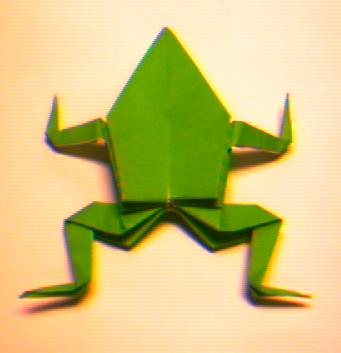
GRRR go to submit to neopets and I get
Quote:
ERROR : File must be a JPG or GIF type image. (ie. have the '.jpg' or '.gif' extension at the end of the file name in LOWERCASE letters). You submitted filetype: image/jpeg.
Kiss the Mortogs


1 Bring apposing corners together and crease the center to form a triangle.
2 Open back up into a square.
3 Fold corners to meet making a crease across the previous fold.
4 Open back up to a square. You will now have 2 folds creating an X on your square.
5 Fold corners to meet corners forming a rectangle.
6 Push the folded right corner down between the front and back of rectangle. Flatten along previously made creases.
7 Push the folded left corner down between the front and back of rectangle. Flatten along previously made creases.
8 You will now have a triangle.
9 Fold left flap over to the center of the triangle.
10 Fold right flap over to the center of the triangle.
11 Fold both flaps back half way
12 This is the top of the Mortog. Turn over so top is laying on the table.
13 Folds left long corner to meet at the top corner.
14 Folds right long corner to meet at the top corner.
15 Fold right corner over to center.
16 Fold left corner over to meet right corner.
17 You now have a gem shape.
18 Fold right top layer (facing the nose) back over the larger fold to form front leg.
19 Fold left top layer (facing the nose) back over the larger fold to form front leg.
20 Fold leg section of body in half about 2/3 of the way down from the nose.
21 Fold legs back half way from previous fold.
22 Flip over onto belly. You can now make the mortog jump by pressing the tip of your finger over the center rear and sliding back with your finger.

 Login
Login Register
 FAQ
FAQ Search




 So many cheap ideas. i gotta think of something more original. I saw a tree in an origami book once...


 lol
lol

 and im afraid if i tell my friends they will laught at me